
DSH工作流DSH-LULUX Flow
一个模型,驱动所有 CLI。One model.Every coding CLI.
在 DeepSeek Harness 里,用你已经配好的模型跑 Claude Code、Codex、Gemini CLI、Qwen Code 和 Grok CLI。Run Claude Code, Codex, Gemini CLI, Qwen Code and Grok CLI on the model you already configured in DeepSeek Harness.
非官方社区插件,由社区成员独立开发和维护,与 DeepSeek 没有隶属关系,也未获 DeepSeek 认可或背书。An unofficial community plugin, independently developed and maintained. Not affiliated with, or endorsed by, DeepSeek.
作用域网关Scoped gateway
不登录。不交钥匙。No logins.No keys handed over.
插件在 DSH 里放了一个小网关。每个 CLI 启动时只拿到一枚绑定本次运行的令牌,只能访问这个网关;网关再把每次调用转给 DSH 正在用的模型。The plugin puts a small gateway inside DSH. Each CLI starts with a token bound to that run, which only works against the gateway; the gateway forwards every call to the model DSH is already using.
- 作用域网关Scoped gateway仅 127.0.0.1 · 本次运行令牌127.0.0.1 only · run-scoped token
 你的 DSH 模型Your DSH model你配置的服务商与密钥Your providers and keys






网关The gateway
密钥留在 DSH,CLI 照样干活。Keys stay in DSH.The CLIs still work.
五款 CLIFive CLIs
Claude Code、Codex、Gemini CLI、Qwen Code、Grok CLI。Claude Code, Codex, Gemini CLI, Qwen Code and Grok CLI.
四种协议,一个网关Four wire formats, one gateway
Anthropic Messages、OpenAI Chat Completions、OpenAI Responses、Gemini,流式输出、工具调用和用量统计完整透传。Anthropic Messages, OpenAI Chat Completions, OpenAI Responses and Gemini, with streaming, tool calls and token usage carried through.
密钥从不交给 CLIKeys never reach the CLI
环境变量按白名单构建,每次运行独立配置目录;令牌只存哈希,运行结束即吊销。The environment is built from an allowlist and every run gets a private config directory. Tokens are stored only as hashes and revoked when the run ends.
权限由你定Permissions you choose
只读、需审批、可编辑、完全权限,映射到各 CLI 自己的参数。内核页设置是上限,工作流节点只能更低。Read-only, ask, edit or full, mapped to each CLI's own flags. The Kernels page sets the ceiling; a workflow node can only ask for less.
三种用法Three ways to use it
当对话 Agent、当子代理,或者当工作流里的一个节点,和 DSH 自己的 Agent 并肩工作。As your chat agent, as a subagent, or as a node in a workflow, alongside DSH's own agents.
内核管理Kernel manager
检测已安装的 CLI 与版本,把缺的装进插件数据目录;安装包逐一对照锁文件校验后才运行安装脚本。Detects installed CLIs and versions and installs missing ones into the plugin's data directory. Every tarball is checked against the lockfile before any install script runs.
CLI 仍以你的系统用户身份运行,能读取你的用户能读的文件。处理不受信任的仓库时,请在系统沙箱或独立用户下运行 DSH。A CLI still runs as your OS user and can read whatever your user can read. For untrusted repositories, run DSH in an OS sandbox or as a separate user.
工作流画布Workflow canvas
把 CLI接成流水线。Wire your CLIsinto pipelines.
在 DSH Web 里拖拽一张 DAG:十种节点,成功/失败与真/假分支,重试、超时、并发与预算一应俱全。Drag out a DAG in DSH Web: ten node types, success/failure and true/false edges, retries, timeouts, concurrency and budgets.


十种节点Ten node types
inputoutputagentkernelscripthttpconditionloopapprovalnotify
-
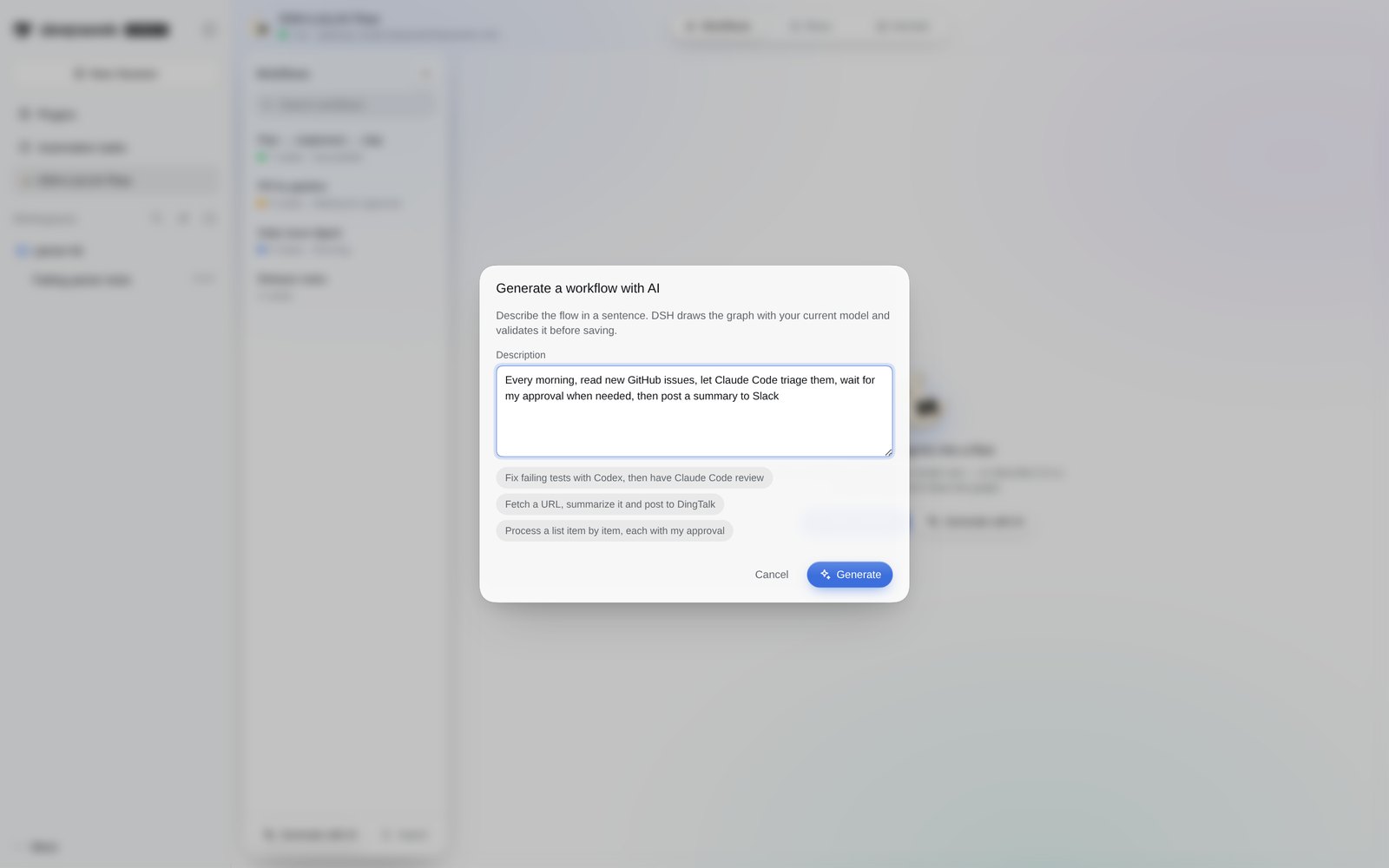
一句话,生成一张图。Describe it. Get a graph.
“用 AI 生成”从一句描述起草工作流,并自动检查。Generate with AI drafts a workflow from one sentence, then lints it.
-
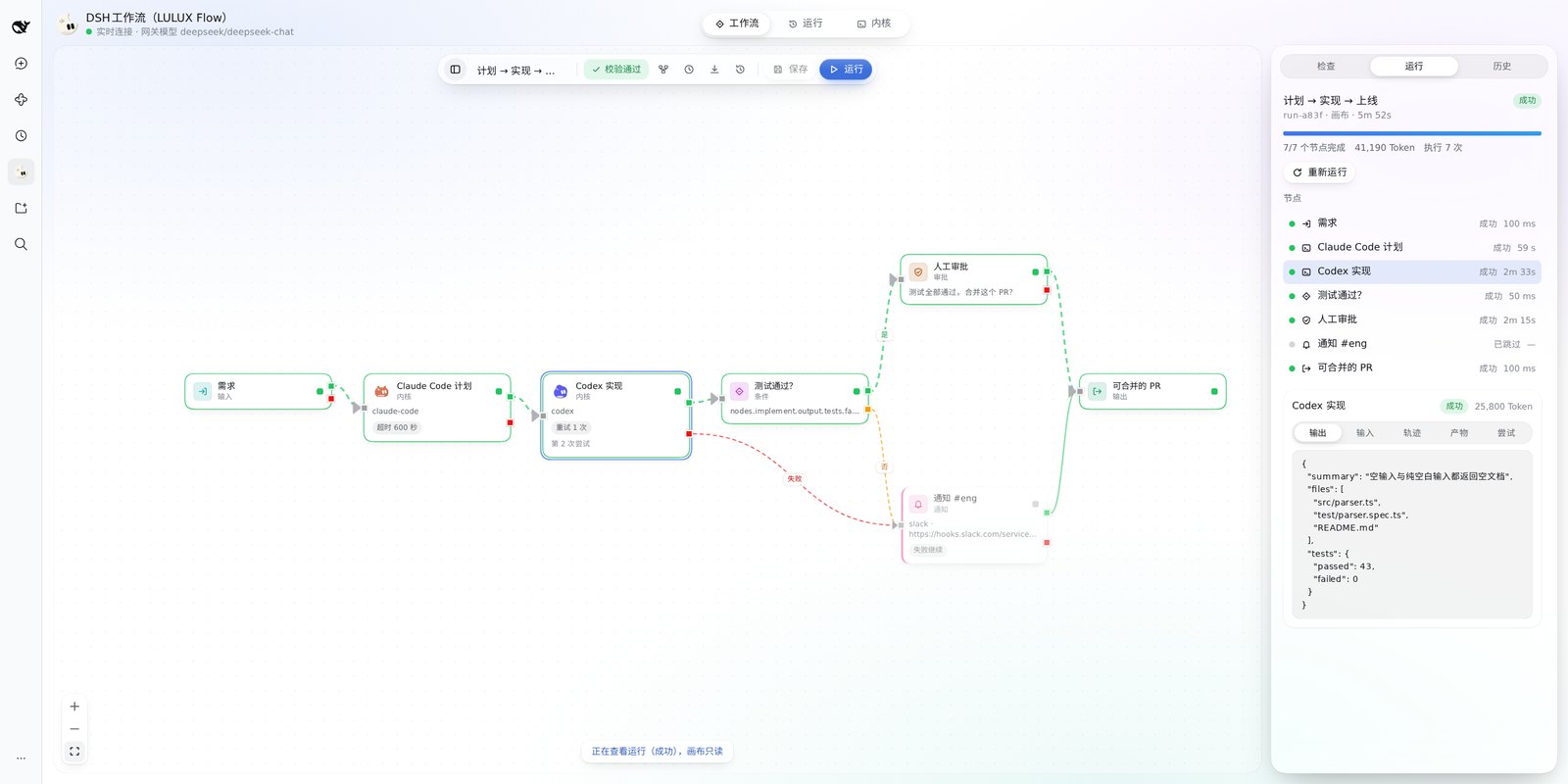
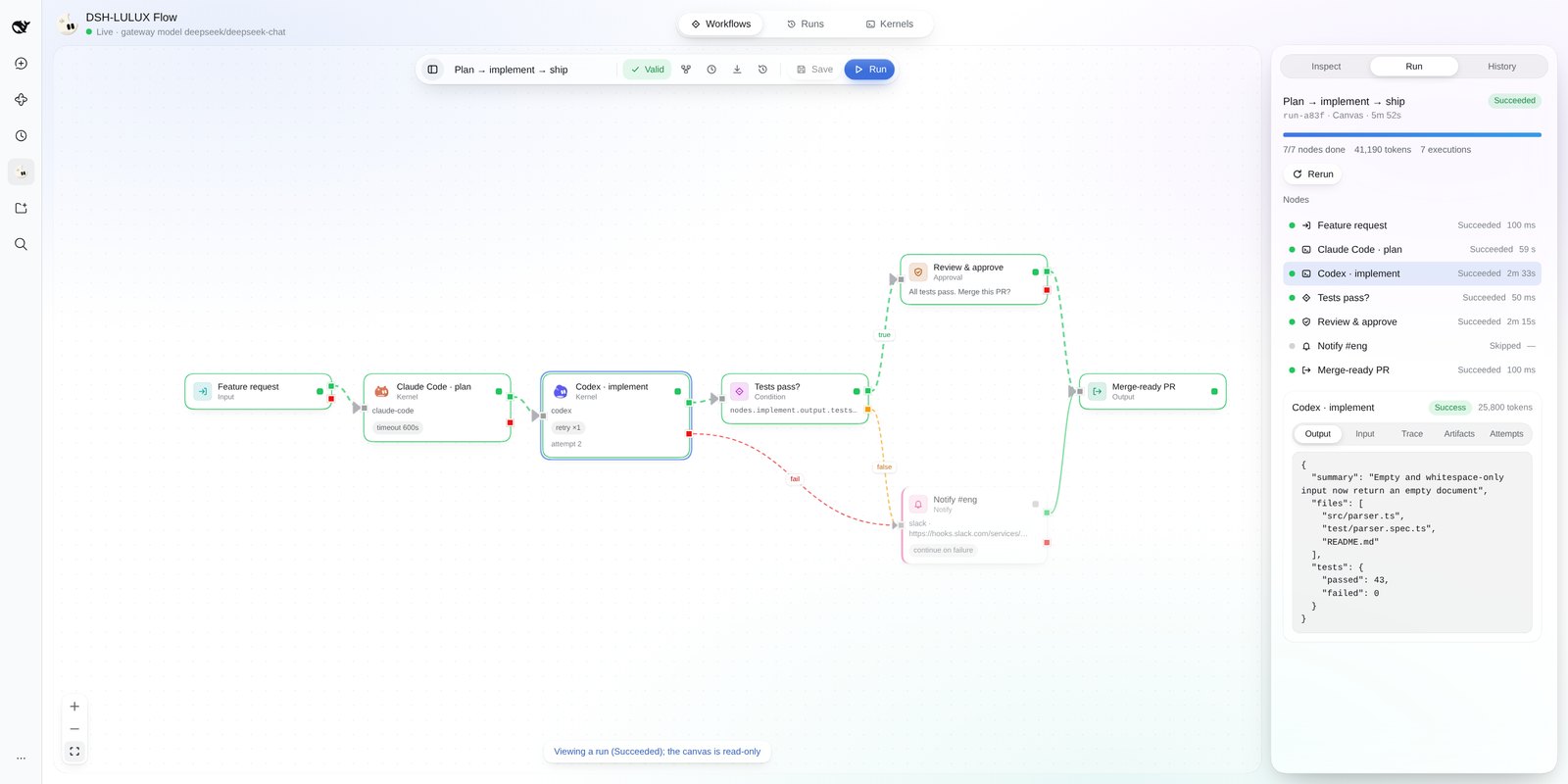
看清每一个节点。See every node.
运行详情逐节点展示输入、输出、轨迹和 Token 用量;可取消、可在重启后续跑、可重跑。The run inspector shows input, output, trace and token usage per node. Cancel, resume after a restart, or re-run.
-
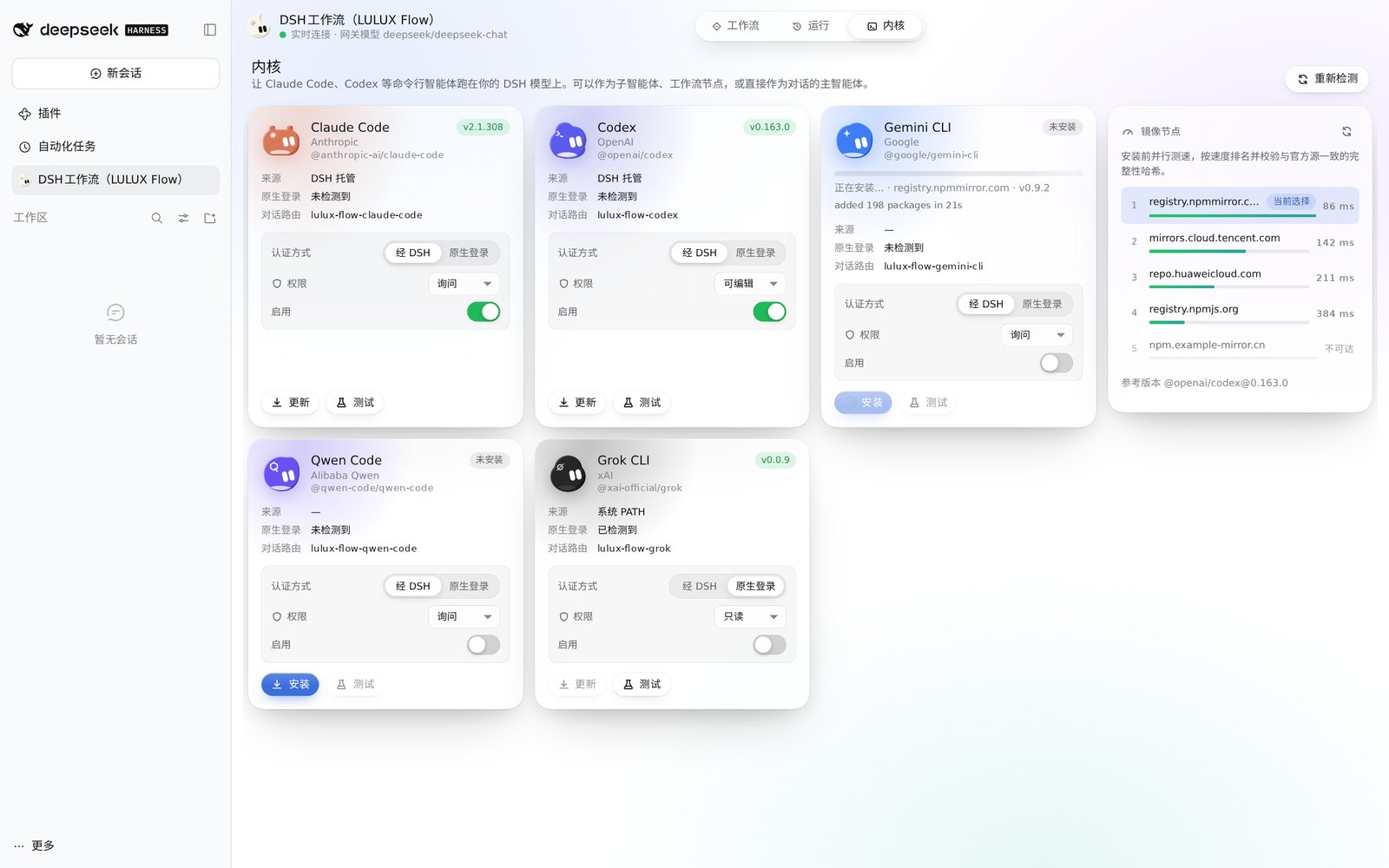
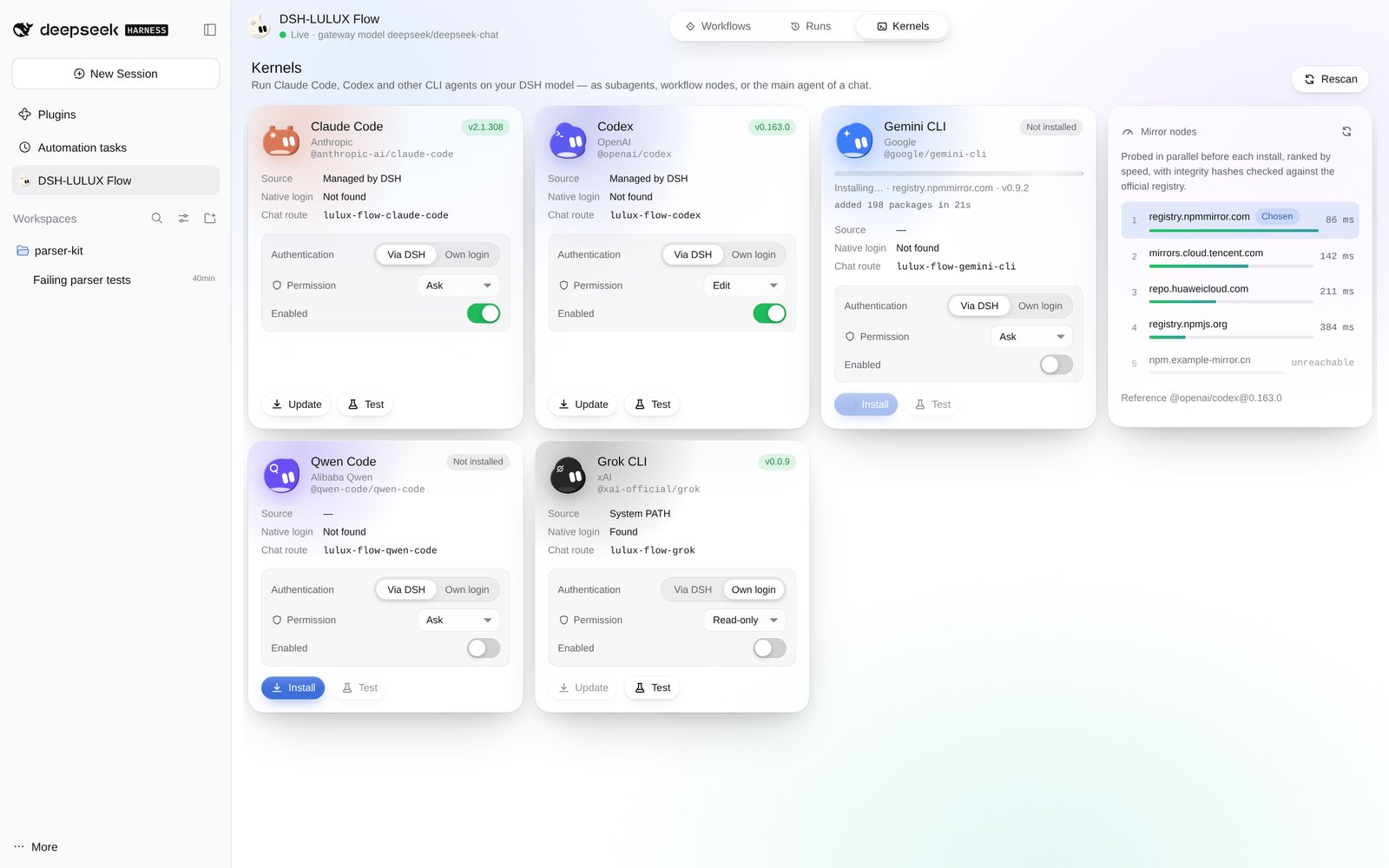
每个 CLI,一页管好。Every CLI, managed on one page.
内核页显示每个 CLI 是否安装、版本、走网关还是原生登录、权限上限;缺的可以直接安装。The Kernels page shows whether each CLI is installed, its version, whether it uses the gateway or its own login, and its permission ceiling. Missing ones install from there.


先审,再跑。Review before run.
由对话模型编写、用 AI 生成或导入的工作流,都标记为“未审核”,在画布里批准之前不会从任何触发器运行。Workflows written by the chat model, generated with AI or imported start as unreviewed, and won't run from any trigger until you approve them in the canvas.
随时触发。Trigger it your way.
画布手动运行、对话中由模型调用、cron 定时,或带签名的 Webhook。From the canvas, from chat through model tools, on a cron schedule, or through a signed webhook.
安装Install
一行命令,装进 DSH。One command.Right into DSH.
安装命令Install command
dsh plugin --profile web add github:koko2376/dsh-lulux-flow需要 DeepSeek Harness >=0.2.1-rc.2 <0.3.0 和 Node.js >=22.15.0。安装后重启 DSH,侧边栏和设置里就会出现 DSH工作流。Requires DeepSeek Harness >=0.2.1-rc.2 <0.3.0 and Node.js >=22.15.0. Restart DSH afterwards and DSH-LULUX Flow appears in the sidebar and in Settings.
DSH Desktop 用户请把 --profile web 换成 --profile desktop。On DSH Desktop, replace --profile web with --profile desktop.
从 GitHub 安装时会在本机编译。如果 pnpm 提示需要 allowBuilds,按仓库 README 的说明添加后重新安装即可。A GitHub install compiles on your machine. If pnpm asks for allowBuilds, add the names it reports as described in the README, then install again.
工程与安全Engineering and security
按生产标准打造。Built to production standards.
- 网关只监听回环地址,校验 Host,拒绝任何浏览器请求。The gateway listens on loopback only, checks the Host header and refuses any browser request.
- Webhook 使用 HMAC-SHA256 签名,±5 分钟时间窗并防重放。Webhooks are HMAC-SHA256 signed, with a ±5 minute window and replay protection.
- HTTP 与通知节点内置 SSRF 防护;跨域跳转时丢弃凭据。HTTP and notify nodes have SSRF protection; credentials are dropped on cross-origin redirects.
- 脚本节点默认关闭,只能在插件配置中开启。Script nodes are off by default and can only be enabled in the plugin config.
- TypeScript 严格模式,单元与集成测试,CI 覆盖 Linux、macOS、Windows。TypeScript strict mode, unit and integration tests, CI on Linux, macOS and Windows.
- 运行记录和工具输出中的敏感字段自动打码。Secret-named fields are redacted in run records and tool output.
还有一些已知限制,例如网关转发时会丢弃图片、Windows 下启动 CLI 尚未端到端验证。完整列表见仓库 README。There are known limitations, such as images being dropped when forwarding and Windows CLI launch not yet verified end-to-end. The README has the full list. 查看已知限制See known limitations(在新窗口打开)(opens in a new window)
非官方社区插件,由社区成员独立开发和维护,与 DeepSeek 没有隶属关系,也未获 DeepSeek 认可或背书。An unofficial community plugin, independently developed and maintained. Not affiliated with, or endorsed by, DeepSeek.